The {gt} package is all about making it simple to produce nice-looking display tables.
Basics with a Simple Table
Let’s use a less common dataset that is available in the R datasets package: islands. It’s actually not a data frame but a named vector. That’s okay though, we can use use dplyr and prepare a tibble from it:
# Take the `islands` dataset and use some# dplyr functionality to obtain the ten# biggest islands in the worldlibrary(dplyr)islands_tbl<-tibble( name =names(islands), size =islands)|>slice_max(size, n =10)# Display the tibbleislands_tbl
## # A tibble: 10 × 2
##    name           size
##    <chr>         <dbl>
##  1 Asia          16988
##  2 Africa        11506
##  3 North America  9390
##  4 South America  6795
##  5 Antarctica     5500
##  6 Europe         3745
##  7 Australia      2968
##  8 Greenland       840
##  9 New Guinea      306
## 10 Borneo          280
Given that islands_tbl is a tibble, we now have a suitable input for gt. (We could have also easily used a data frame instead as well).
That doesn’t look too bad. Oftentimes however, you’ll want a bit more.
Adding Parts to this Simple Table
The {gt} package makes it relatively easy to add parts
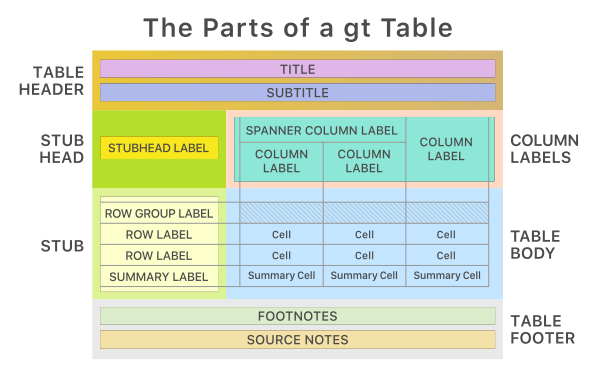
This is the way the main parts of a table (and their subparts) fit together:
We’ll only focus on Title, Subtitle, and Source notes, just to introduce {gt}
A lot of things could be done using the {gt} package; however, we won’t show them. Explore them by yourselves!
1 Header: Title and Subtitle
Table Header use \(\rightarrow\)tab_header() function.
# Make a display table with the `islands_tbl`# table; put a heading just above the column labelsgt_tbl<-gt_tbl|>tab_header( title ="Large Landmasses of the World", subtitle ="The top ten largest are presented")# Show the gt Tablegt_tbl
Large Landmasses of the World
The top ten largest are presented
name
size
Asia
16988
Africa
11506
North America
9390
South America
6795
Antarctica
5500
Europe
3745
Australia
2968
Greenland
840
New Guinea
306
Borneo
280
To bold and italicized characters, we can use ** as used in markdown
# Use markdown for the heading's `title` and `subtitle` to# add bold and italicized charactersgt(islands_tbl[1:2,])|>tab_header( title =md("**Large Landmasses of the World**"), subtitle =md("The *top two* largest are presented"))
Large Landmasses of the World
The top two largest are presented
name
size
Asia
16988
Africa
11506
2 Source notes
A source note can be added to the table’s footer through use of tab_source_note().
It can be called multiple times—each invocation results in the addition of a source note.
gt_tbl<-gt_tbl|>tab_source_note( source_note ="Source: The World Almanac and Book of Facts, 1975, page 406.")|>tab_source_note( source_note =md("Reference: McNeil, D. R. (1977) *Interactive Data Analysis*. Wiley."))# Show the gt tablegt_tbl
Large Landmasses of the World
The top ten largest are presented
name
size
Asia
16988
Africa
11506
North America
9390
South America
6795
Antarctica
5500
Europe
3745
Australia
2968
Greenland
840
New Guinea
306
Borneo
280
Source: The World Almanac and Book of Facts, 1975, page 406.
Reference: McNeil, D. R. (1977) Interactive Data Analysis. Wiley.
3 Save Individual Tables
{gt} tables can be saved directly to file as an image, HTML, Word, RTF, and LaTeX file.
gt_tbl|>gt::gtsave(filename ="my_tbl.docx")# use extensions .png, .html, .docx, .rtf, .tex, .ltx